




- ทดลองใช้ฟรี 14 วัน
- โฮสติ้งฟรี ไม่จำกัด, การรักษาความปลอดภัยชั้นยอด, ทรัพยากรที่เชื่อถือได้, และการสนับสนุนส่วนบุคคลตลอด 24/7
- เทมเพลตเว็บไซต์ที่ยืดหยุ่น & ปรับแต่งได้สำหรับทุกวัตถุประสงค์, เว็บไซต์สมาชิก, แคมเปญอีเมล, การปรากฏตัวบนโซเชียลมีเดีย & อื่น ๆ

- ตั้งค่าชื่อโดเมนด้วยคลิกเดียว. ติดตั้งแอปฟรีกว่า 150 แอปด้วยคลิกเดียว
- ฟรี SSL, การสำรองข้อมูลรายวัน
- บริการช่วยเหลือลูกค้าตลอด 24 ชั่วโมง 7 วัน 365 วัน ผ่านแชท โทรศัพท์ และฐานความรู้
Squarespace vs GoDaddy: Quick Summary
Squarespace and GoDaddy both make building a website easy, but they shine in different ways.
Squarespace is all about sleek, professional-looking sites. It’s perfect for creatives or anyone who wants a standout design.
You get plenty of templates, drag-and-drop customization, blogging, SEO, analytics, and eCommerce tools.
Plans start at $16/month, and while there’s a bit of a learning curve, you get full control over how your site looks.
GoDaddy keeps things simple and fast. Its drag-and-drop builder is beginner-friendly, so you can get online without fuss.
Plans start at $9.99/month and include SEO tools, email marketing, social media integration, and 24/7 phone support.
Squarespace vs GoDaddy: Overview
Here’s a quick snapshot of what each platform offers.
Squarespace Profile
Squarespace is a New York-based website-building and hosting company founded by Anthony Casalena in 2004.
The platform provides software for clients who want to host and build services. Users can use pre-built website templates to create and customize web pages.
It offers features for blogging, social media marketing, eCommerce, etc. Over 4 million websites and 1.9% of the top 10 million websites presently use Squarespace.
GoDaddy Website Builder Profile
The GoDaddy Website Builder is an independent tool distinct from GoDaddy’s hosting and domain services. The builder allows you to create and publish a website without any technical knowledge or coding skills.
The GoDaddy Website Builder offers a variety of templates, along with drag-and-drop functionality for easy layout and design adjustments.
It also includes SEO features, social media integration, email marketing, and eCommerce capabilities for users looking to sell products or services online.
1. Pricing Plans Comparison
If you want to find out how much you’ll pay and what you’ll get, take a look at the prices below.
Squarespace Pricing Plans
Squarespace offers four pricing plans:
| Personal | Business | Commerce Basic | Commerce Advanced |
| $16/month | $23/month | $27/month | $52/month |
Squarespace has plans for everything, from personal portfolios to full-blown online stores. The Personal plan starts at $16/month and works well for simple sites. At $23/month, the Business plan adds eCommerce and analytics.
If you’re running a larger shop, the Commerce Basic plan ($27/month) drops transaction fees, and the Commerce Advanced plan ($52/month) gives you extras like advanced shipping and discounts.
GoDaddy Website Builder Pricing Plans
GoDaddy offers three pricing plans for its website builder.
| Basic | Standard | Premium |
| $9.99 /month | $11.99/month | $14.99 /month |
GoDaddy’s plans range from $9.99 to $14.99 per month, all including a custom domain connection, with each tier adding more email marketing capacity, SEO tools, and social media support, which makes them suitable for everything from basic sites to more advanced online needs.
2. Ease of Use Comparison: Which Platform Is Easier to Use?
Wondering which platform makes life easier for beginners? Let’s check below:
Squarespace Ease-of-Use
Drag-and-drop editor
Squarespace lets you easily tweak your website’s elements while still giving you plenty of ways to personalize your site.

This balance makes it a powerful tool for those who want a more hands-on approach to designing their website.
Unlike GoDaddy, Squarespace gives you full control over your site’s layout and design. But all those features come with a bit of a learning curve, especially if you’re new to web design.
The platform’s easy-to-use interface helps smooth things out by guiding you through the design with handy templates and customizable blocks for text, images, and multimedia.
Squarespace templates and customization
Squarespace has over 60 templates that are known for their modern look and how well they adapt to any device.

What makes Squarespace’s templates stand out isn’t just how good they look, but how they’re built to fit all kinds of businesses, so you can find a design that really matches your style and needs.
You can customize fonts, colors, buttons, and layouts, and even dive deeper into design panels to tweak everything from headers to footers.
This lets you fine-tune your site to perfectly reflect your brand or personal style.
GoDaddy Ease-of-Use
Drag-and-drop editor
The GoDaddy drag-and-drop editor is ideal if you have little or no web design experience.

The editor makes it easy to add, move, and change elements on your pages. This straightforward setup cuts down the usual web design hassle, so anyone can use it, no matter their experience level.
Templates and customization
GoDaddy has a wide variety of templates that work well for lots of different businesses and personal sites.

These templates give you a great starting point, but they don’t offer quite as much detailed customization as Squarespace.
With these templates, users can easily tweak colors, fonts, and basic layouts, which makes the design process simple even without deep design know-how.
This easy setup, along with GoDaddy’s straightforward tools, makes it a great choice for individuals and small businesses who want to get online fast without the usual web design headaches.
3. Features and Tools Comparison
Below, you’ll explore what each platform has in its toolbox.
Squarespace Features and Tools
These are some of the key features and tools of Squarespace:
- Squarespace Website Design
- Creator Tools
- Digital Marketing
- Email Marketing
- Analytics
- SEO tools
- Squarespace Extensions
Squarespace Website Design

Under this Website Design feature, you get access to the following:
- Blogging Tools
- Portfolio Designs
- Customizable Templates
- Website builder
Squarespace offers some of the best templates out there, with plenty of high-quality, modern designs for customers to choose from.
All templates easily adapt to mobile devices, and the drag-and-drop feature lets newcomers customize their websites with plenty of freedom.
Templates come in handy for creatives who want to use Squarespace to display their online store and products or photography and artwork in a neat but extra creative way.
With a click of a button, you can turn your ideas into a reality with the perfect template.
Creator Tools

Squarespace’s Creator Tools are built to help users easily build and manage their online presence. They cover everything from website and content management to handling sales and connecting with social media platforms.
Digital Marketing
The Squarespace Digital Marketing feature has these tools and more:
- Email Campaigns
- Squarespace AI
- Social Media Integrations
- Squarespace Video Studio App
- Newsletter Blocks
- Banners & Promotions
- Marketing Analytics
- Custom Favicon

Squarespace’s digital marketing features are tailored to grow your online presence and engagement.
Email Campaigns let you create beautifully designed newsletters that match your site’s look and feel.
Squarespace AI allows you to create customized AI-generated marketing copies.
Social media integrations make it easy to share content across platforms, and the Squarespace Video Studio App helps you quickly create branded videos.
Newsletter Blocks let visitors easily sign up right on your site. Banners and promotions help spotlight offers or key info, while marketing analytics give you a clear view of how your campaigns are doing.
Email Marketing

Squarespace offers a range of email marketing templates that match the style and feel of your website, keeping everything visually consistent.
These templates are customizable, allowing users to align their email campaigns with their brand identity seamlessly.
With Squarespace’s email marketing tools, you can design good-looking emails, manage your mailing lists, and track how your campaigns are doing, all from the same platform, which makes your digital marketing feel more connected and easy to handle.
Analytics

Squarespace’s analytics feature will help you keep an eye on several other key indicators to see how your site is growing.
You can view your traffic, sales, and visitor geography.
Some key performance metrics to keep an eye on include orders, revenue, conversion rate, revenue per visit, units sold, and average order volume.
You can also see where most of your visitors or customers are coming from for better insights.
All of these insights can help you focus your marketing efforts more effectively and grow your business.
Squarespace Extensions

Squarespace offers a range of extensions that help eCommerce businesses boost sales and serve customers more efficiently.
For example, finance extensions help with bookkeeping, sales tax, and account management. Inventory and product extensions make it easier to track stock levels, manage SKUs, and introduce new products.
Sales and marketing tools help promote products across multiple channels and engage customers with offers. There are also shipping and fulfillment extensions to streamline order processing, handle returns, and keep customers updated with tracking and notifications.
SEO tools
Squarespace’s Built-in SEO tools enable you to customize page titles and descriptions, optimize your URLs, and add alt text to images for better indexing.
Additionally, Squarespace automatically generates a sitemap and uses clean HTML markup to help search engines understand your site’s structure.
With these tools, you can also integrate with Google Search Console to monitor site performance and identify areas for improvement, supporting a detailed SEO strategy directly from your Squarespace dashboard.
GoDaddy Features and Tools
Here’s a closer look at some of GoDaddy’s most important and standout features.
- Website Building Features
- Marketing tools
- Web Analytics Features
- SEO Wizard
- Online Appointments Features
- Blog Features
Website Building Features

GoDaddy streamlines site creation with features like click-and-drag to adjust layouts and a backup system for extra peace of mind.
Navigation is easy thanks to drop-down menus, and you can customize themes to match your style.
Features like promo banners, contact forms, and calls to action help spark engagement, and members-only pages are on the way to add exclusivity.
Plus, the built-in image library makes it easy to manage visuals across your site, giving you everything you need to create and maintain a professional online presence.
Marketing tools

GoDaddy’s website builder helps boost your online visibility with built-in SEO tools and Google My Business integration. It also keeps customers engaged through email marketing and social media links, including Facebook and Instagram.
You can create personalized messages and posts right from the dashboard, and with the review widget, you can display customer feedback from Google or Facebook on your site to build trust with visitors.
SEO Wizard
GoDaddy handles the technical SEO for users, so no need for custom code or plugins. Its SEO Wizard guides you through business questions and makes key adjustments like keyword suggestions, meta tags, alt text, and URL slugs.
You also get personalized optimization tips. Besides, blogging was added to the SEO Wizard, but it still lacks features like editable SEO settings for blogs and control over auto-generated page URLs.
4. Website Performance Comparison: Which Builder Is Faster?
We tested speeds, and the results are almost too close to call.
Fast websites improve customer experience by keeping visitors engaged, while slow sites risk higher bounce rates as users seek faster alternatives.
Uptime is the percentage of time your website is available to visitors. An uptime of 99.999% is excellent, so when choosing a web host, aim for providers offering uptime close to that.
Squarespace Performance & Speed
While they do a respectable job, Squarespace websites aren’t the fastest websites around.
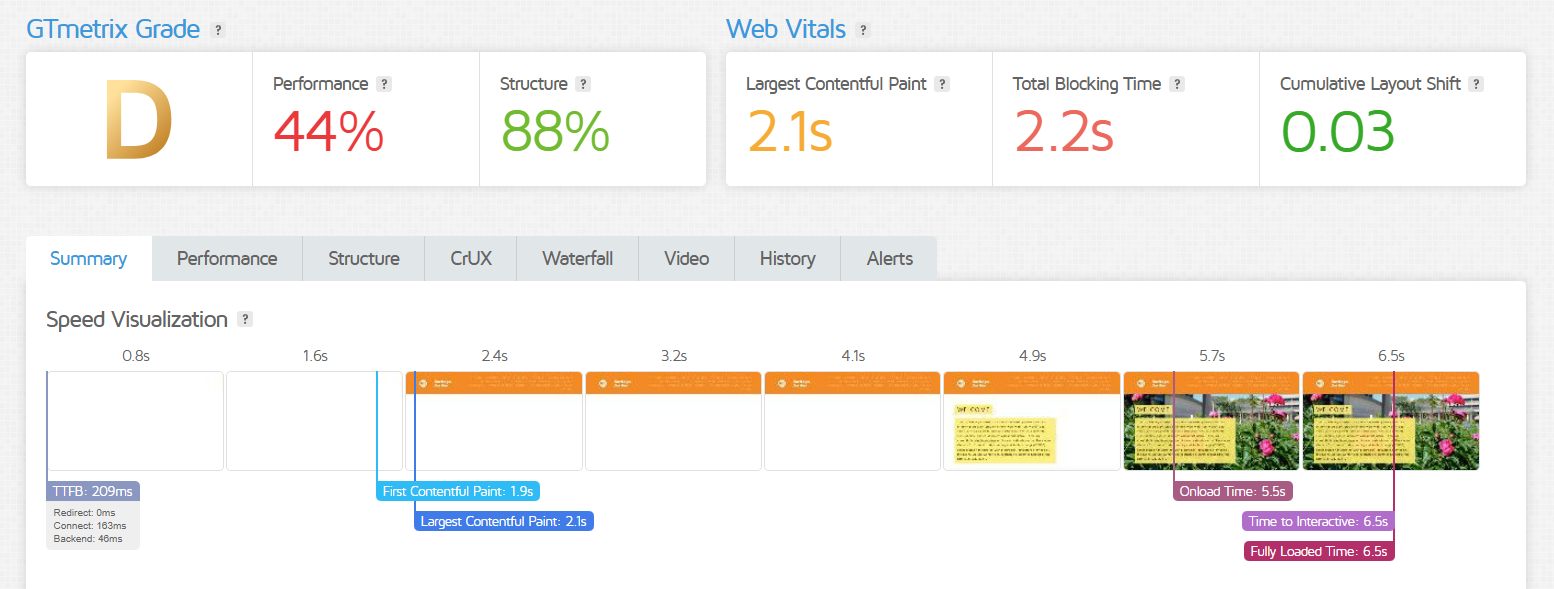
According to GTmetrix, the site holds up well structurally (88%), but speed is clearly an issue. It takes over 6.5 seconds to fully load, mostly because of long blocking times.
While the first content shows up fairly quickly, the delay in becoming interactive could frustrate users.
On the plus side, there’s very little layout shifting, so the visual flow stays steady.
GoDaddy Website Builder Performance & Speed
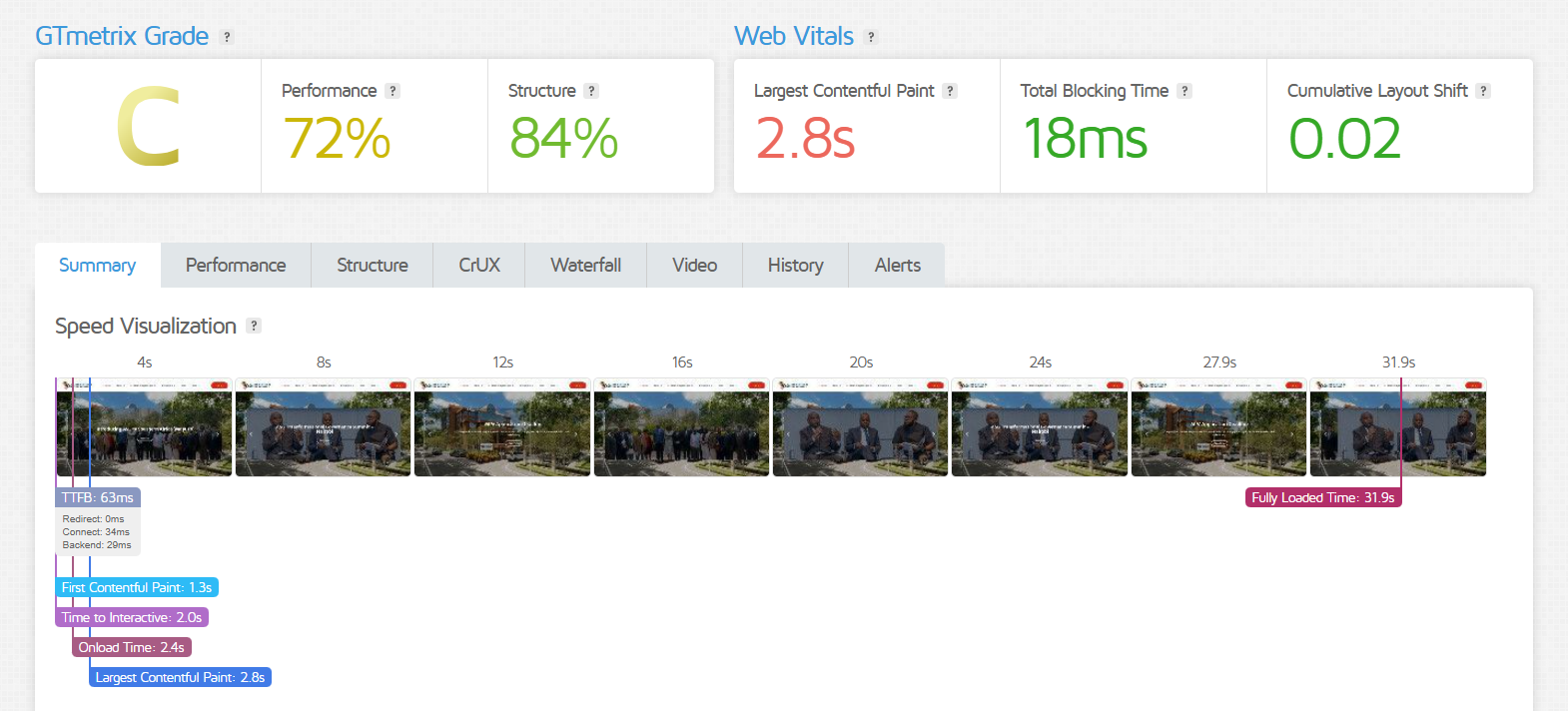
The site has a solid structure and responsive layout, making navigation smooth.
Performance could improve, as the largest visible content takes over 2.5 seconds to load, and some users might find this slow.
Interaction feels responsive since there are no long blocking delays, and layout shifts are minimal, avoiding distracting jumps. However, the full load time exceeds 30 seconds, which may affect user experience and could use optimization.
5. Help and Support: Who’s Got Your Back?
Let’s find out where to turn when you need help.
Squarespace Customer Support
Squarespace gives you plenty of ways to get help whenever you need it, like 24/7 email support, live chat, the Squarespace blog, and a detailed knowledge base and help center to answer your questions.
The first thing you’ll see when you reach out to Squarespace support is a suggestion to check their knowledge base.
It’s packed with helpful articles that cover pretty much everything you need to know about using the platform.
Squarespace’s live chat is available Monday to Friday, from 4 a.m. to 8 p.m., so if those hours don’t work for you, email is your best bet.
Just keep in mind, you need to have a Squarespace account to get in touch with their support team.
GoDaddy Customer Support
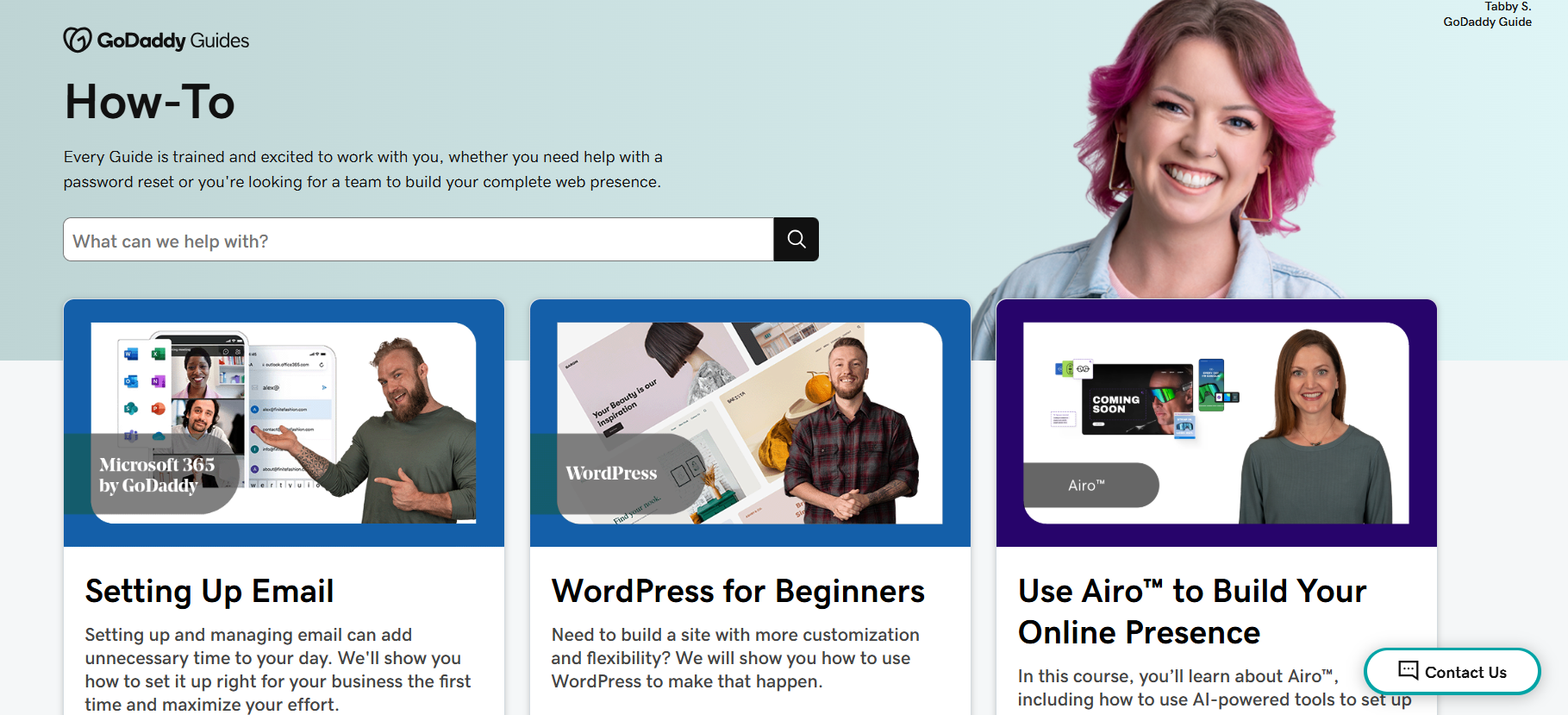
GoDaddy offers phone support, live chat, a detailed help center, a GoDaddy community, and how-to video tutorials.
GoDaddy’s live chat is available 24/7, although many find it a bit disappointing. Luckily, their phone support more than makes up for it. It’s available anytime, all year round.
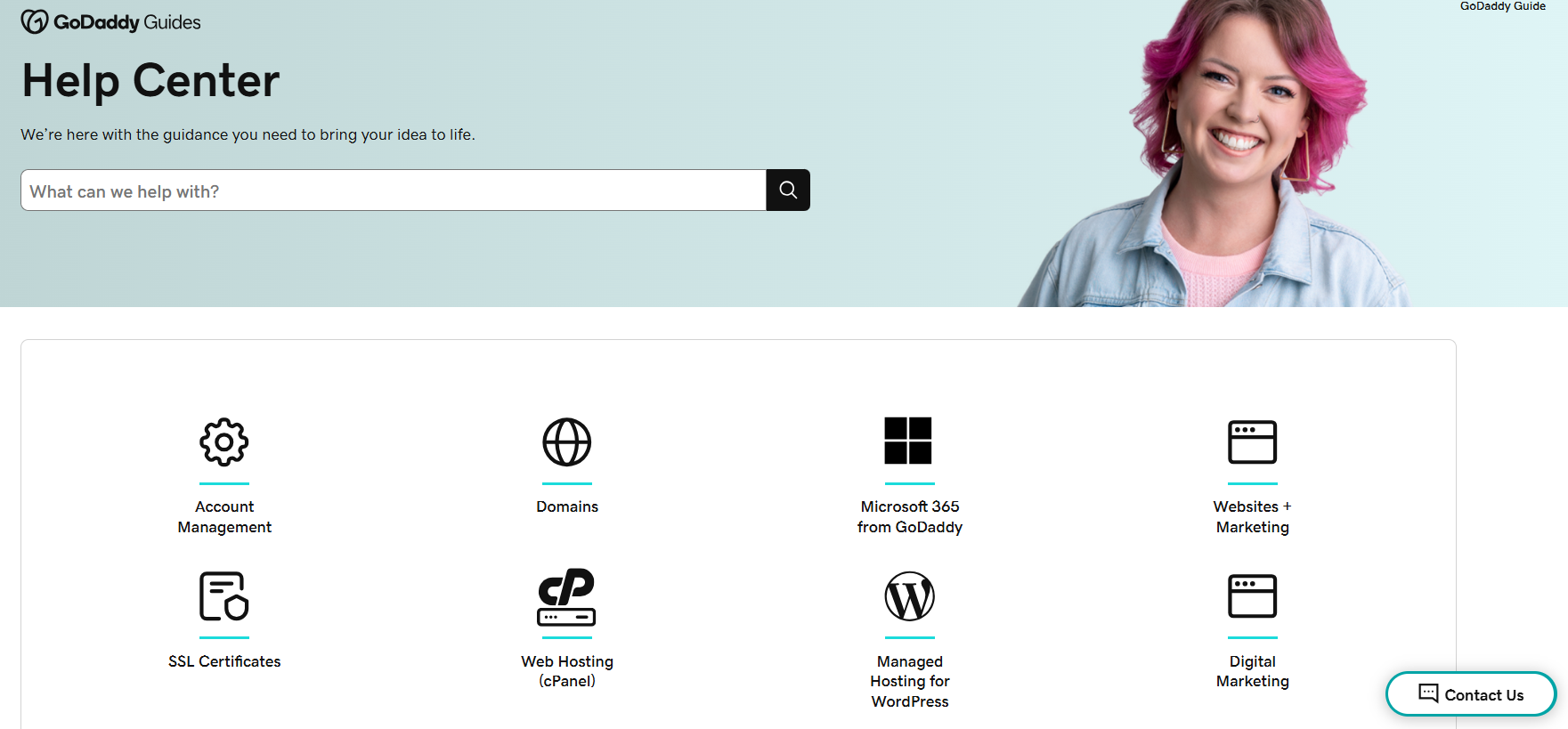
GoDaddy’s help center is one of the best out there, packed with guides to help newcomers get started.
You’ll find info on everything from domains and account management to WordPress, email, SSL, and more. Plus, there’s a handy search box if you need answers to something specific.
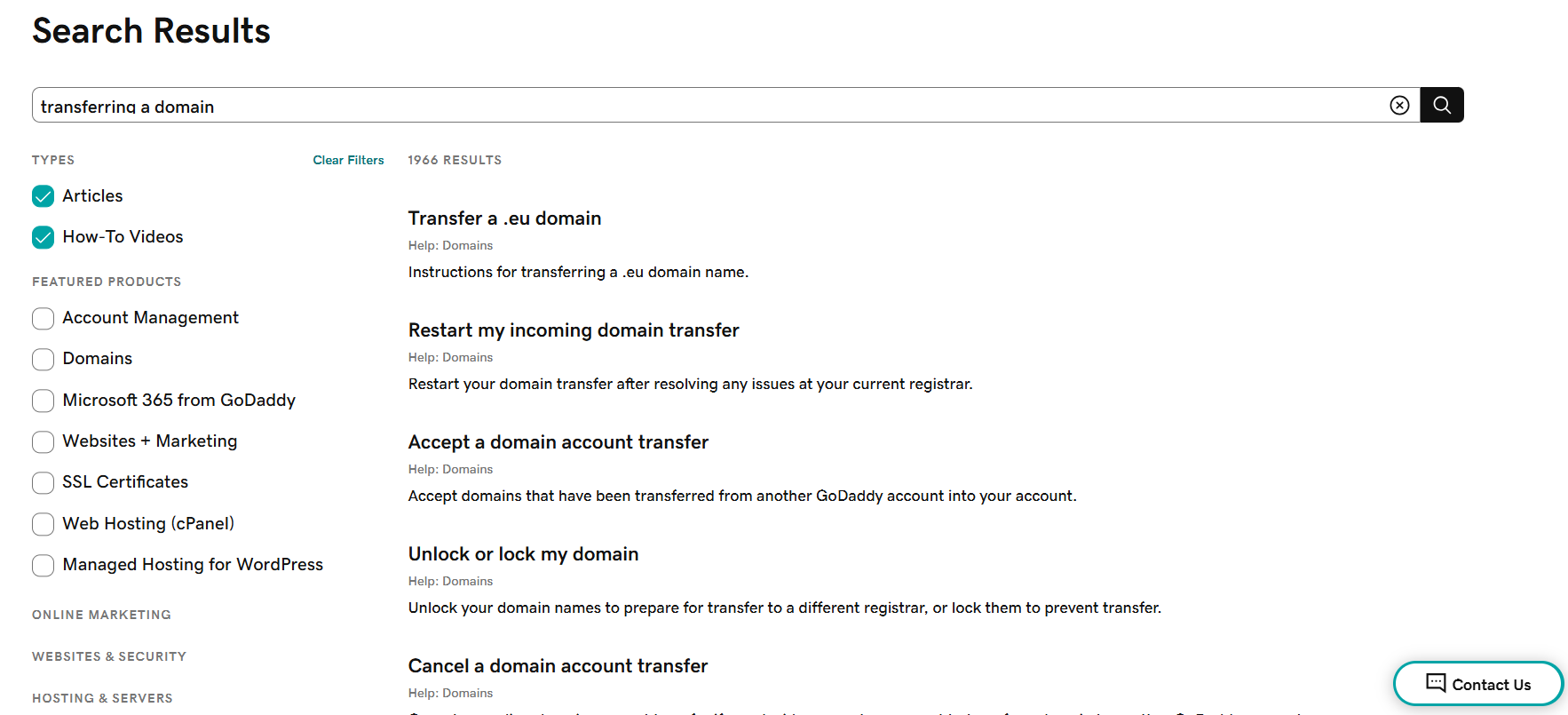
GoDaddy’s tutorial videos are also available for users who are more visual learners. These videos contain hundreds of important lessons and tips to help every GoDaddy user. One great thing about these videos is that they come in high-quality resolutions with easy hacks to your needs.
GoDaddy’s community is a great support perk where users can ask experienced folks for advice, join discussions, check out events, and connect with groups like WooCommerce users.
Overall, GoDaddy’s support is solid, but they could improve by adding email support and a better ticket system.
6. Ecommerce Features Comparison
Let’s see which platform is better for selling online.
Squarespace eCommerce Features
Squarespace’s eCommerce features include:
- eCommerce templates with sleek designs tailored for online sales
- Product listings and categories that enable organized displays and improve customer browsing experiences
- Scheduling tools that help you automate payments to set up reminders
- Client Invoicing that is both professional and branded
- Membership sites with exclusive content or products for subscribers
- Shipping & Fulfillment management to handle orders, returns, and delivery updates
GoDaddy Website Builder eCommerce Features
The GoDaddy Website Builder offers tools for online store creation and management. These include:
- Easy-to-use templates designed for online stores
- Product listings and inventory tools to help manage stock and organize offerings
- Secure payment processing to support major payment options
- Shipping and tax calculation tools for accurate checkout totals
- Promotional tools like coupon codes to drive sales
- Integration with marketplaces and social media to expand product reach
- 24/7 support and mobile editing to manage your store on the go
Squarespace vs GoDaddy: Final Recommendations
Here’s a quick refresher to help you decide which one is right for you.
Why Choose Squarespace
Squarespace is a top web hosting and publishing site that helps thousands of users set up their online sites yearly. You should use Squarespace if:
- You’re more creative and have no problem designing and creating your ideal website.
- You want standout, visually striking templates to give your site a unique edge over the competition. Squarespace offers over 110 templates that aren’t one-size-fits-all. They’re designed with different types of websites in mind.
- You don’t know much coding, but you need to customize your site further.
When to Consider GoDaddy
As mentioned before, GoDaddy is the most popular domain registrar in the world, with millions of active users. Here’s when it makes sense to use it:
- You’re new to web hosting and are looking to try out some features for a short-term website.
- You need 24/7 phone support.
- You want inexpensive domains.
The Bottom Line
When comparing Squarespace and GoDaddy’s website builders, Squarespace stands out with more advanced design tools and in-depth eCommerce features, which is perfect if you care about looks and flexibility.
GoDaddy focuses more on ease of use and quick setup, which makes it a solid pick if you want a simple, fast way to get online.
Both platforms serve different needs: Squarespace is great for customization, while GoDaddy is ideal for getting started quickly with less fuss.

